Start a project info@oneewaee.com

Kathmandu, Nepal

OUR SOFTWARE PRODUCTS

Find the right tools for your business.

Start with the work you need to do. Each product page explains the features, availability and implementation in more detail.

Manage business operations

Organize clients, service delivery, documents and website content.

Oneesys connects business records, document workflows and website content.Business workspaceDocuments & workOrganize and reviewWebsite contentManage and publishOneesys connects business records, document workflows and website content.Business workspaceClients, documents & workWebsite contentManage and publishConnected operationsWorkflows & review
Capability illustration

Oneesys

Configurable platform

Manage your business and website.

Bring client records, documents, service workflows and website content into a configurable workspace. AI-assisted scanning helps your team prepare information for review.

  • Business and customer workspaces
  • Website content and publishing
  • AI-assisted document processing
OneeCRM connects clients, their work and the responsible team.ClientsRecords & documentsWorkTasks & engagementsYour teamResponsibility & progressOneeCRM connects clients, their work and the responsible team.ClientsRecords & documentsWorkTasks & engagementsYour teamResponsibility & progress
Capability illustration

OneeCRM

Business implementations

Keep clients, work and your team connected.

Track client information, documents, engagements, billing and deadlines. Give your team a clear view of responsibilities and clients a place to provide requested information.

  • Client records and document requests
  • Tasks, engagements and compliance
  • Billing and team coordination

Support customers and communicate

Help people find answers and give your team tools to stay connected.

OneeAI connects customer questions with business knowledge and a response or staff handover.Customer questionConversation contextBusiness knowledgeConfigured informationAnswer or handoverSupport & next stepsOneeAI connects customer questions with business knowledge and a response or staff handover.Customer questionConversation contextBusiness knowledgeConfigured informationAnswer or handoverSupport & next steps
Capability illustration

OneeAI

In customer use

Help customers get answers and reach your team.

Use your business information to support customer questions and configured inquiry workflows. Keep the conversation context when a member of your team takes over.

  • Answers from configured business knowledge
  • Inquiry, quotation and support workflows
  • Conversation continuity and staff handover
Oneemail brings domain email, team communication and shared files together.Company-domain emailChat & callsCalendar & contactsFiles & sharingOneemail brings domain email, team communication and shared files together.Company-domain emailAccounts & administrationTeam communicationChat, calls & calendarsShared informationContacts, files & sharing
Capability illustration

Oneemail

Available now

Bring business communication together.

Use email on your own company domain, alongside chat, calls, calendars, contacts and files. Organization controls help you manage people, accounts and access.

  • Company-domain email and administration
  • Chat, calls, calendars and contacts
  • File sharing and compatible mail clients

Work with data and locations

Calculate, review and explore the information your business uses.

OneeSheet supports workbook calculation, analysis and review.WORKBOOKABCDCalculate. Analyze. Review.Illustration of analytical toolsOneeSheet supports workbook calculation, analysis and review.Create a workbookData, tables & formulasCalculate and visualizeCalculations & chartsReview your informationAnalysis & reporting
Capability illustration

OneeSheet

Web workspace available

Turn spreadsheet data into useful work.

Create and edit workbooks, calculate formulas and prepare reports in a web workspace. Our ongoing development covers shared editing, data refresh and financial review.

  • Formulas, tables, charts and reports
  • XLSX workflows and compatibility inspection
  • Local editing, collaboration and review
OneeGIS connects mapped plots, location records and observation layers.Mapped plots and layersLocation recordsSearch and inspect contextOneeGIS connects mapped plots, location records and observation layers.Mapped layersPlots & imageryLocation recordsLinked contextual dataExplore your mapSearch & inspection
Capability illustration

OneeGIS

Powers the Sakhejung map

Connect places to the information behind them.

Explore mapped locations, boundaries, satellite imagery and linked records. OneeGIS powers Sakhejung Tea’s garden map and can be scoped around another organization’s spatial data.

  • Interactive maps and plot boundaries
  • Searchable location and plot records
  • Imagery, observation layers and 3D views

Deliver media or build something specific

Explore streaming engineering or scope a system around your own requirements.

OneeStream connects video processing, protected delivery and playback.ProcessQuality variantsDeliverAccess & packagingPlayAdaptive viewingOneeStream connects video processing, protected delivery and playback.ProcessQuality variantsDeliverAccess & packagingPlayAdaptive viewing
Capability illustration

OneeStream

Engineering demonstrations

Build the experience around your video.

Streaming engineering covering media processing, quality variants, secure delivery and playback. OneeStream demonstrates adaptive viewing and resume playback.

  • Video processing and multiple qualities
  • DASH/HLS packaging and protected delivery
  • Adaptive playback and viewing continuity
Custom software delivery: plan, build and support.PlanRequirements & scopeBuildWeb, mobile & cloudSupportDeploy & improveCustom software delivery: plan, build and support.PlanRequirements & scopeBuildWeb, mobile & cloudSupportDeploy & improve
Project delivery illustration

Custom software

Development services

A system built around your requirements.

We design and develop web, mobile and cloud software for your organization. Start with the workflow you need to improve and the systems you already use.

  • Web and mobile applications
  • Enterprise workflows and integrations
  • Deployment, onboarding and support

Oneesys and OneeCRM belong to the same product family. Oneesys combines business operations with website content management. OneeCRM focuses on the client and service workflows used in business implementations.

ONEEAI / INTELLIGENT HELP & SUPPORT

Help customers find answers and reach your team.

OneeAI uses your configured business information to help customers with questions, inquiries and support. The Sakhejung Tea implementation connects specialist product questions, buyer requirements and quotations, while keeping your team involved.

Answers from your information

Connect the assistant to your approved product and service information, with the conversation context carried between turns.

Support connected to your workflow

Configure inquiries, quotations and document checks around the work your business actually handles.

Your team can take over

Staff can continue the conversation with the customer context intact, and review the work that needs their attention.

How a configured OneeAI implementation works
OneeAI connects customer questions with business knowledge and a response or staff handover.Customer questionConversation contextBusiness knowledgeConfigured informationAnswer or handoverSupport & next stepsOneeAI connects customer questions with business knowledge and a response or staff handover.Customer questionConversation contextBusiness knowledgeConfigured informationAnswer or handoverSupport & next steps
Your information

Product details, services and business knowledge.

Your workflow

Configured inquiries, actions and staff handover.

Capability illustration. Explore the real customer implementation below.
Read Sakhejung Tea’s customer story

OUR TECHNOLOGY STACK

The technologies we build with.

See what each part of the stack does, why it matters to your business and where it appears in our products. The tools follow the work the system needs to support.

How the parts fit together
Interfaces, business logic and operationsThe experienceWebsites & web workspacesMobile & real-time interfacesWorkbook & map interactionThe working logicAPIs & business workflowsAI & document processingMail & connected servicesThe operating layerBusiness records & databasesFile storage & access controlsDeployment & delivery
User interfaces connect to business logic and the records, storage and deployment behind them.User experienceWeb, mobile & specialized toolsBusiness logicAPIs, AI & connected workflowsRecords & operationsData, storage & deploymentUser interfaces connect to business logic and the records, storage and deployment behind them.User experienceWeb, mobile & specialized toolsBusiness logicAPIs, AI & connected workflowsRecords & operationsData, storage & deployment
Illustrative architecture. Each product uses the components its workload needs.

Web and interface engineering

Interfaces people can use

Help customers and colleagues complete their work in a browser.

Tools and methods
  • Next.js
  • React
  • TypeScript
  • Tailwind CSS
  • HTML & CSS
  • Blazor / WebAssembly
  • SkiaSharp
Where it appears

Public websites, customer portals and the OneeSheet workspace.

Backend and operational systems

Records and business logic

Keep clients, work, permissions and operational records connected.

Tools and methods
  • Python / FastAPI
  • C# / .NET 10
  • ASP.NET Core / SignalR
  • Node.js
  • Rust
  • PostgreSQL
  • MongoDB
  • Redis
Where it appears

Client records, engagements and billing in OneeCRM.

AI and document workflows

AI connected to your business

Use business information to answer questions and prepare work for review.

Tools and methods
  • Business knowledge retrieval
  • Embeddings and search
  • Tool integration
  • Document extraction
Where it appears

Sakhejung’s OneeAI assistant and Oneesys document drafts.

Cloud, storage and delivery

Storage and software operation

Provide the deployment, storage and access model a workload needs.

Tools and methods
  • AWS / Azure
  • Amazon S3
  • AWS KMS
  • Docker / Nginx
  • Linux / XFS / ZFS
Where it appears

Oneemail Drive’s documented Amazon S3 and AWS KMS architecture.

SPECIALIZED ENGINEERING

Different workloads need different tools.

Explore the protocols and systems behind communication, mobile work, maps and media.

Communication across tools

Give a team company-domain email that can work with compatible clients.

JMAPIMAP / SMTPCalDAV / CardDAVSPF / DKIM / DMARC
Explore this technology
Work that continues across devices

Bring messages, tasks and customer information to connected interfaces.

Flutter / DartReact NativeServer-sent eventsWebSocket-based workVoice and video interfaces
Explore this technology
Places connected to records

Help users move between a mapped location and the information behind it.

MapLibreMapbox / Esri imagerySpatial geometrySentinel-2 layer context
Explore this technology
Discovery and media delivery

Make information searchable and prepare video for adaptive playback.

ElasticsearchFFmpegGPU / NVENC workDASH / HLS packaging
Explore this technology

CUSTOMER IMPLEMENTATIONS

See how businesses use our systems.

Explore customer implementations from Sakhejung Tea and N Ghimire and Associates, including support, mapping and business operations.

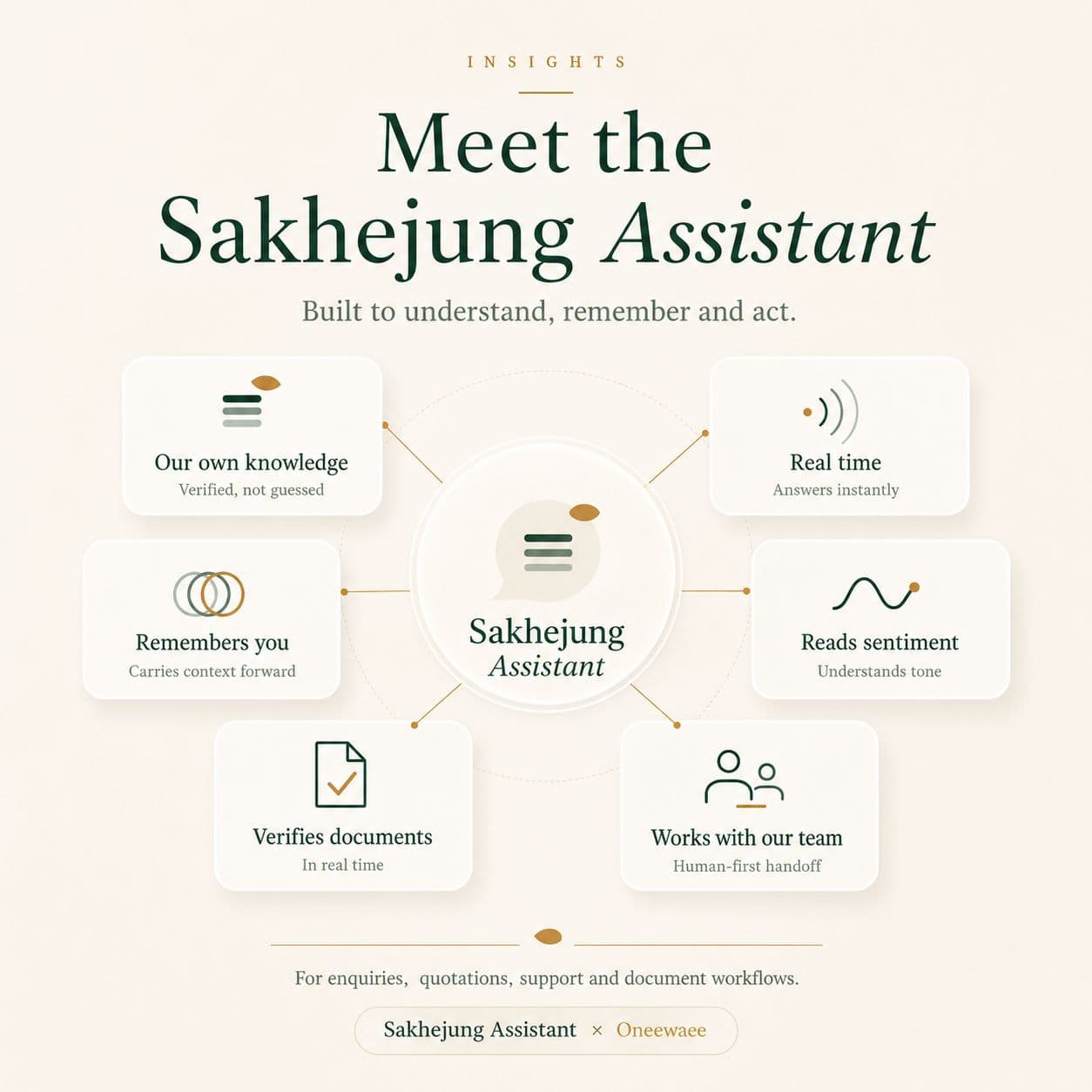
Sakhejung Assistant overview published by Sakhejung Tea.

ONEEAI / CUSTOMER SUPPORT

Sakhejung Tea

A knowledge-grounded assistant for product questions, buyer inquiries, quotations and support, with conversation continuity and staff handover.

Explore the AI implementation
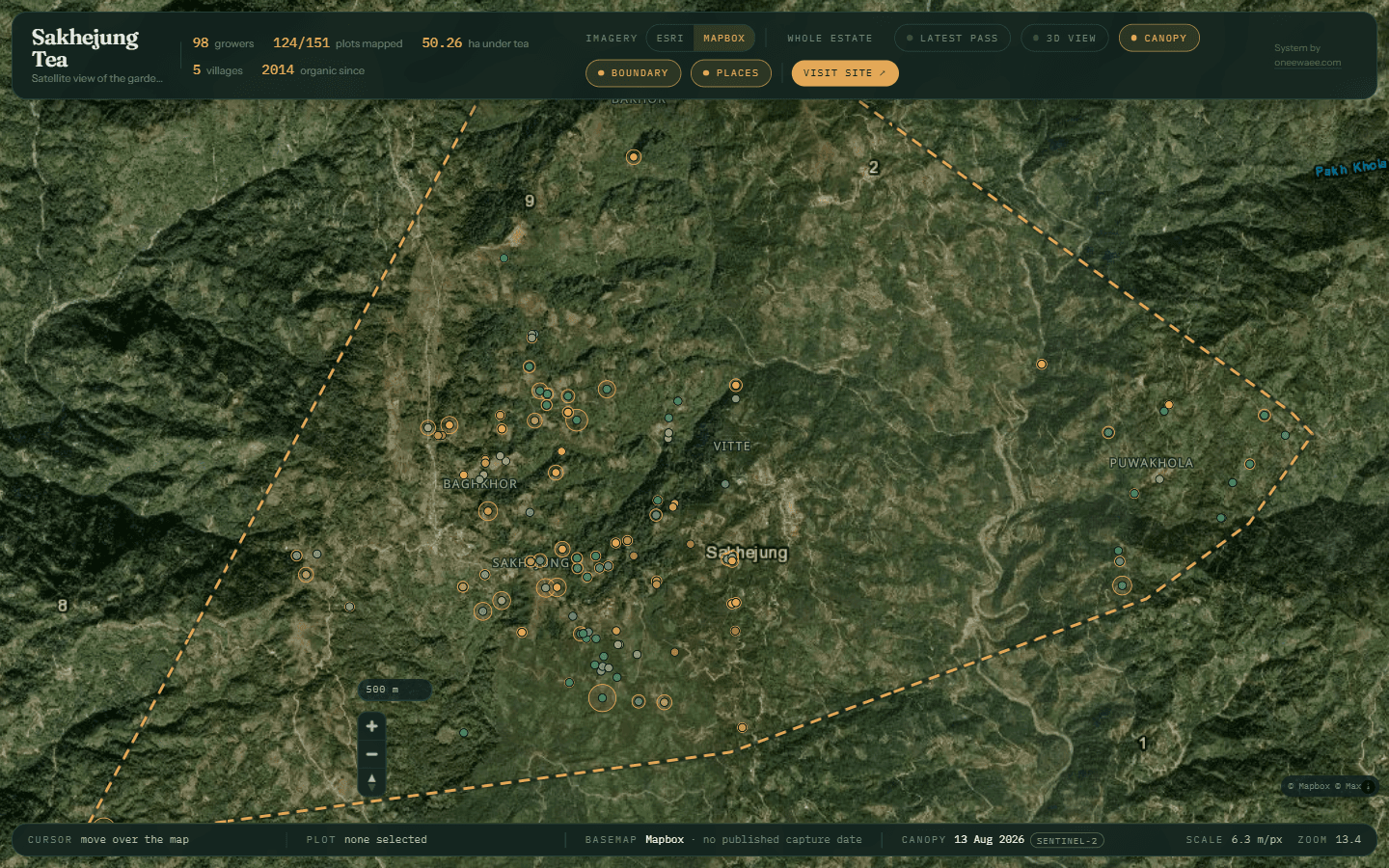
The live Sakhejung satellite garden map. Individual grower records are hidden in this capture.

ONEEGIS / LIVE IMPLEMENTATION

Sakhejung garden map

Powered by OneeGIS: satellite imagery, plot boundaries, grower records and observation layers in one navigable estate map.

Explore the mapping system
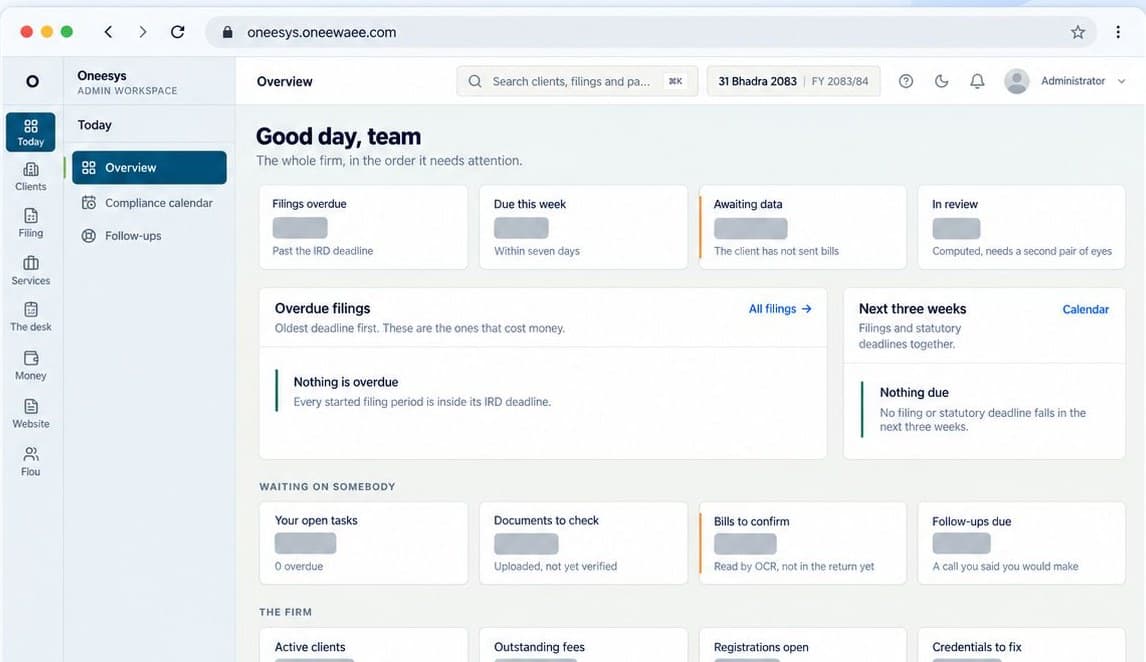
Oneesys interface illustrating the Oneewaee CRM platform family, with customer information hidden.

ONEECRM / BUSINESS OPERATIONS

N Ghimire and Associates

Client records, document review, engagements, compliance, billing and customer workspaces connected around the firm's daily work.

Explore the CRM implementation

BUILD WITH ONEEWAEE

Need a system built for your organization?

Start with the work you want to improve. We can configure a product, connect existing tools or develop a custom system around your users and requirements.

A PRACTICAL STARTING POINT

Use an existing product or scope a custom system.

We first understand your workflow and existing tools. Then we agree whether product setup, an integration or a custom build is the right next step.

Project delivery: understand the work, agree a solution, launch and support.Understand the workPeople, data & existing toolsAgree the solutionProduct setup or custom buildLaunch & supportDeployment & onboardingProject delivery: understand the work, agree a solution, launch and support.Understand the workPeople, data & existing toolsAgree the solutionProduct setup or custom buildLaunch & supportDeployment & onboarding
The scope, cost and timeline follow your requirements.
  1. 01Launch a website or web applicationYou need a public presence, publishing platform, storefront or customer portal.Web applications & websitesCMS & publishing platformsE-commerce & product discovery
  2. 02Organize your business workflowsClients, documents, tasks and billing are spread across separate tools.CRM, ERP & business operationsIntegration & modernization
  3. 03Add AI and responsive customer supportCustomers need answers and your team needs useful context when it takes over.AI assistants & workflow automationReal-time engagement systems
  4. 04Set up business communicationYour organization needs company-domain mail and a practical migration path.Business email & collaboration
  5. 05Build a map or connected mobile toolYour users work with locations, field records or information across devices.Geospatial & satellite applicationsMobile & connected workspaces
  6. 06Deploy and operate your systemsYour application needs hosting, storage, media processing or an operating plan.Media & streaming engineeringCloud infrastructure & operations

THE ENGINEERING IN DETAIL

How we handle complex requirements.

Important behavior often sits behind the screen. These examples show how records are checked, access is applied and work continues when people or systems take over.

Oneesys

Review scanned figures before they become records

A person can check extracted values against the original document before confirming them.

  1. Source documentBill or uploaded scan
  2. Reviewable draftFields & arithmetic
  3. Confirmed recordHuman verification
Explore Oneesys

OneeAI

Keep context when AI hands work to a person

Customers can continue the conversation without starting their explanation again.

  1. Customer questionStored conversation
  2. Business knowledgeConfigured tools
  3. Team handoverContext retained
Explore OneeAI

Oneesys & OneeCRM

Keep document access consistent

The same record scope needs to hold when a person browses, searches or downloads a file.

  1. Requested documentUser & record scope
  2. Permission checkUnderlying resource
  3. Allowed actionView, search or download
Explore Oneesys & OneeCRM

OneeSheet

Keep calculations and reviewed figures traceable

People need to know what was calculated, saved and approved, even when a workbook changes.

  1. Workbook editsData & dependencies
  2. Calculate & preserveState & recovery work
  3. Review the figuresApproval evidence
Explore OneeSheet

RESEARCH & DEVELOPMENT

Research that improves our products.

We investigate real product problems, from understanding a calculation to preserving conversation context. The aim is a useful improvement supported by evidence.

FROM A PRODUCT PROBLEM TO A CHECKED CHANGE

Research starts with something people need the software to do.

What happens if a save is interrupted? Does an imported formula still mean the same thing? Can a colleague take over an AI conversation with its context intact?

We turn these questions into experiments, exercise the relevant parts of the system and record what is proven and what still needs validation.

Oneewaee’s applied research cycleDefine the problemA real product requirementBuild an experimentAn isolated prototypeVerify the behaviorEvidence from the systemImprove the productRelease and learn
An engineering process, guided by product problems and recorded checks.

OneeSheet

Make workbook calculations easier to trust

People should be able to understand a result and see which imported workbook features are supported.

The question we investigate

How can a workbook remain understandable when formulas, imported objects and connected data interact?

  1. Workbook inputFormulas & imported files
  2. Calculate & inspectDependencies & compatibility
  3. Understand the resultVisible support boundaries
How we check the work
  • Check formula results and their dependencies
  • Test calculations and the visible workbook together
  • Import and export files, inspecting unsupported features
Explore this research area
A formula cell depends on other cells; the workbook reports which features are supported, preserved or unsupported.ABCResultDependencies are tracedfrom inputs to the resultSupportedPreservedUnsupportedCompatibility
Capability illustration of this research focus.

OneeAI & Oneesys

Make AI useful inside a business workflow

Answers and extracted information need relevant context, clear action boundaries and a path to human review.

The question we investigate

How does an assistant move from a plausible reply to a useful, controlled business interaction?

  1. Business informationKnowledge & documents
  2. Configured intelligenceRetrieval & workflow tools
  3. Useful next stepAnswer, review or handover
How we check the work
  • Test customer questions and team handover
  • Check answers against sources and documents
  • Exercise errors, waiting states and retry behavior
Explore this research area
A customer question is answered from approved business knowledge, or handed to a person with the context kept.Customer questionBusiness knowledgeApproved sources and toolsTeam membertakes overHandoverConversation kept
Capability illustration of this research focus.

OneeGIS

Help people interpret the map they are viewing

A location becomes more useful when its records, imagery sources and observation dates remain connected.

The question we investigate

How can imagery, plot records and observations stay connected as a user searches, selects and navigates?

  1. Plots & imageryGeographic sources
  2. Link the contextRecords & observation dates
  3. Explore and interpretSelection & layer behavior
How we check the work
  • Check that map selections open the matching records
  • Show imagery sources and observation dates
  • Test layers, navigation and phone layouts
Explore this research area
Map boundaries and imagery stay connected to the record and observations for a selected plot.Plot recordImageryPlotsObservations
Capability illustration of this research focus.

ABOUT ONEEWAEE

A software company building from Nepal.

We are Oneewaee Tech Pvt. Ltd., incorporated on April 5, 2026. Our team develops software products and works with organizations on the systems they need to communicate, manage work and serve customers.

Our portfolio connects business operations, content, AI assistance, communication and specialized engineering. We take projects through discovery, architecture, development, deployment and ongoing support.

Founder & CEOKrishna Kusiyait YadavView founder profile
About the company

HOW WE WORK

From requirements to a working system.

Clear scope, regular review and a plan for operating the software after it launches.

01

Understand the work

Map users, records, workflows, existing tools and constraints. Agree what the system needs to do.

02

Design the system

Work through the interface, architecture, access model and integrations before the build.

03

Build and review

Develop in stages and review working software against the agreed business scenarios.

04

Deploy and support

Prepare hosting, migrate data where needed, onboard the team and agree ongoing support.